• Skip to primary navigation
  • Skip to main content
dma-logo-icon
  • WordPress development
  • Managed Hosting
  • Portfolio
  • News
  • Contact
  • WordPress development
  • Managed Hosting
  • Portfolio
  • News
  • Contact
Say hello
Hide Search

Archives for February 2023

WordPress Managed Hosting, what makes it so different?

Peter Shilling · Feb 28, 2023 · Leave a Comment

At The DMA, we tend to hosting and manage most of the WordPress projects that we develop. Having control of the hosting environment allows to deploy our client’s website in a super fast environment that is secure and robust.

In this article we’re going to dig into Managed WordPress hosting a little more, explaining it and comparing it to a shared hosting environment. Let’s go!

What is Shared Hosting?

Shared hosting is an environment where multiple websites (some times many thousands of sites) share the same server resources, such as disk space and bandwidth. This means that your website will be hosted alongside other websites on the same server. This can impact performance if there is high traffic or resource usage by other websites. One site that is getting a lot of traffic can cause the rest of the sites in the environment to be starved of resources, and perform poorly.

And Managed Hosting?

Managed WordPress hosting, on the other hand, is a specialised type of hosting that is designed specifically for WordPress websites. This type of hosting typically includes features such as automatic WordPress updates, advanced security measures, and dedicated resources for optimal performance. The DMA’s managed hosting environment also offers powerful features like quick data restores, a CDN network, plugin updates and monthly performance testing.

Now that we’ve established the difference between shared hosting and managed WordPress hosting, let’s take a closer look at the specific areas where these two types of hosting differ.

Security

When it comes to security, managed WordPress hosting providers typically offer advanced security measures such as malware scanning, automatic updates, and firewalls to protect WordPress websites from hacking attempts and other security threats. Shared hosting providers may also offer some basic security measures, but may not provide the same level of specialized security for WordPress sites.

Performance

In terms of performance, managed WordPress hosting is optimised specifically for WordPress, which can result in faster load times, better handling of high traffic, and improved overall performance.

A key part of our platform that improves performance is caching.

Caching is the process of storing frequently accessed data or web pages in a temporary storage location, so that they can be accessed quickly and easily without having to be loaded from scratch every time. This can significantly improve website performance and reduce server load.

Our platform uses Varnish. It’s a high-performance HTTP accelerator that sits in front of WordPress web servers and caches frequently accessed pages and data. By caching content in memory, Varnish can serve requests quickly and efficiently, without having to go back to the web server every time a page is requested.

For WordPress sites, Varnish can be especially useful. WordPress sites often have dynamic content that changes frequently, which can make caching more difficult. However, Varnish can be configured to cache dynamic content intelligently, using a combination of time-based and content-based caching.

By sitting in front of a WordPress site, Varnish can reduce the load on the web server and improve website performance. This can result in faster page load times, improved user experience, and better search engine rankings.

Typically Shared Hosting environment never provide this level of WordPress optimisation.

What about the Human Element?

Have you ever had to call your telephone company with a problem? You probably dreaded it. You’ll be on the call for ages talking to someone that really can’t solve the problem. The team behind The DMA’s managed hosting setup might be small but the above situation will never happen to you! Send an email ticket or a phone call asking for help and you’ll connect with someone (often it’s me!)
Should I be using a CDN with my WordPress website?

Peter Shilling · Feb 20, 2023 · Leave a Comment

As a website owner, you’re always looking for ways to improve your site’s performance and speed. One of the tools you might consider using is a Content Delivery Network (CDN). In this post, we’ll take a look at what a CDN is and why it’s a good idea to use a CDN for your WordPress website.

(Quick spoiler: all of our managed WordPress hosting customers make use of our global CDN network, we set it up and enable it for each and every one of our hosting customers).

What is a CDN?

A CDN is a network of servers that are distributed around the world. When a user requests a resource (think a webpage and / or an image that is part of your page), the CDN will deliver that resource from the server that is closest to the user. This means that the resource can be delivered more quickly and efficiently than if it were delivered from a server that is located far away.

Why use a CDN for a WordPress site?

Faster page load times

Page load time is an important factor that affects a user’s experience on your website (no-one likes to stick around on a sluggish website) and your search engine rankings. Using a CDN, you can improve your site’s page load times. Since the CDN delivers resources from the server that is closest to the user, it can reduce the time it takes to load a page.

Better performance during high traffic periods

If your site experiences a lot of traffic, a CDN can help to reduce the load on your site. By distributing the load across multiple servers (because users are in different geographic locations), a CDN can handle more requests and prevent your site from becoming overloaded.

Improved security

A CDN can also improve your site’s security. Since the CDN delivers resources from its own servers, it can help to prevent DDoS attacks and other types of attacks on your site. This can help to ensure that your site remains up and running even during an attack.

What else can a CDN do for you?

We use the CloudFlare CDN, transparently for all our managed hosting clients. On top of the standard features outlines above, there are some unique tools when using CloudFlare. One such offering is their image optimisation tool Polish. Let’s dig into what that is!

Polish Image Compression Tools

Polish includes several different tools, including lossless and lossy compression, image resizing, and WebP conversion. Generally speaking this compression makes the file size of your image smaller without (much) difference in visual quality – your image still looks the same). Lossless compression reduces the file size of an image without affecting its quality at all. While lossy compression sacrifices some quality to achieve a greater reduction in file size. WebP conversion is a newer image format that can provide better compression than traditional formats like JPEG and PNG. The CDN, on-the-fly does creates a WebP version of your image an update your webpage’s code to serve it to the user.

It’s worth noting that while Polish can be a powerful tool for improving your site’s performance, it’s not a one-size-fits-all solution. It’s still best practice to provide the smallest file size image you can in your WordPress dashboard. Then let Polish squeeze every bit of optimisation out of it.

Wrapping up, there is a bit of an introduction to CDNs, specifically CloudFlare and how it works to keep your WordPress site humming along.

Building WordPress powered sites with SASS

Peter Shilling · Feb 16, 2023 · Leave a Comment

WordPress is still the most popular content management system, used for creating websites. As of 2023 40% of all websites on the internet are built using WordPres. It’s no surprise that so many developers and designers still choose WordPress to build their sites. It’s an easy-to-use platform that offers a wealth of customisation options.

However, building a website can be a complicated process, not all approaches are the same. In this article we are going to dive into one area in particular: the styling of the site. Think green headings, a particular font, how large is the font for the body text etc.. When the team here at The DMA are designing a site, we create a customised WordPress theme for each project, it’s made up of a style sheet, written in a language called CSS.

Our approach is to use a CSS pre-processor: SASS. SASS stands for Syntactically Awesome Style Sheets (we nerds love a good acronym!), it is a powerful tool that can greatly improve site performance and make it easier to maintain a WordPress website over time.

Improved WordPress performance

One of the primary benefits of using SASS within WordPress is improved site performance. SASS allows us to write more efficient and streamlined CSS code, which can help to reduce the size of the stylesheet and decrease page load times.

SASS accomplishes this through its use of variables, mixins, and nesting. Variables allow us to assign values to a specific element in the stylesheet and reuse that value throughout the stylesheet. This reduces the need to repeat code and can result in a smaller stylesheet. A good example here the colours used within your WordPress site. All the headings might be a particular shade of green. This colour is stored as a variable in SASS. If we ever need to update a particular colour across the site we can change it quickly in one place and it flows through the rest of the website.

Mixins allow us to define a group of CSS properties and reuse that group throughout the stylesheet. This can help to reduce the amount of code needed to style a site, again making it easier to update the site’s styling in the future.

Nesting is another powerful feature of SASS. It allows us to nest CSS selectors within one another, which can help to make the stylesheet more organiser, easier to read. This can also help to reduce the size of the stylesheet, as it eliminates the need to repeat selectors multiple times.

Improved Site Maintenance

We have already touched on this but it’s a big benefit of using SASS within WordPress. Controlling the website’s style in SASS can make it easier for us to make changes over time, quickly changing a colour, swapping out a font for a new one, across the entire website. Up-keep of your WordPress site becomes a joy not a hassle.

SASS also offers powerful organisation tools, like partials and imports. Partials allow us to break the stylesheet into smaller, more manageable pieces. This can make it easier to find and update specific sections of the stylesheet. Imports allow us to import code from other stylesheets, making it possible to reuse code across multiple sites.

Not all WordPress site are created equal

Using a CSS pre-processor like SASS within WordPress can greatly improve site performance and make it easier to maintain a site over time. A site built without this kind of technology might look the same to the casual visitor. But over time is unlikely to be at its best in regards to performance and will be harder to maintain over time.

New Domain Name Options for Australian Businesses

Peter Shilling · Feb 14, 2023 · Leave a Comment

In 2022, Australia expanded its domain name options for businesses and individuals. In addition to the popular “.com.au” domain, Australian businesses can now register a domain with the simple “.au” extension. This change offers businesses a new way to present themselves online and create a unique and memorable web presence.

A quick example?

Since 2007 we have used the domain name theDMA.com.au. This is what’s known as a ‘com.au’ domain name. We now have registered theDMA.au. You can refer to this as an ‘.au’ direct domain name. (You can give it a whirl if you like, click here and, well.. you’ll end up back on our website https://thedma.au)

Let’s quickly look at the advantages of the new “.au” domain space.

Shorter domains!

The “.au” domain is shorter and more memorable than the traditional “.com.au” domain. This can make it easier for customers to find your website and remember your brand. Shorter when you’re reading it over the phone or paying for a billboard!

Improved online branding

With the new “.au” domain, you have the opportunity to create a stronger online brand by choosing a domain that is more closely aligned with your company or product name.

More choice

More strings of text are available in “.au”. “.com.au” domain names have been around for a number of years now, many simple and short strings have been already taken. There are opportunities in the newer “.au” direct space to get a domain name that closely, or exactly matches your company name, product or brand.

How to register a “.au” domain

To register a “.au” domain, you must first check its availability and then follow the standard registration process through a domain registrar. The new “.au” domain has the same eligibility requirements as the “.com.au” domain, meaning it must be acquired by a registered Australian Entity (eg a company, sole trader with an ABN etc…)

Next stop? Your preferred domain name registrar!

Enhancing your SEO with JSON-ld

Peter Shilling · Feb 13, 2023 · Leave a Comment

Search Engine Optimisation (SEO) is a crucial aspect of WordPress powered website. While there are many different SEO strategies and techniques you can use to improve your website’s visibility and ranking on search engines, one of the most important and often overlooked methods is the use of structured data.

Structured data is a type of code that helps search engines understand the content of your website, including information about your products, services and your location. Here at The DMA we favour JSON-LD (JavaScript Object Notation for Linked Data), it’s a lightweight and easy-to-use format that you can easily implement on your WordPress website.

Why use JSON-LD markup?

Improves Visibility on Search Engines

Adding JSON-LD structured data to your website, you can help search engines like Google understand the information on your pages. This can lead to better visibility for your website, improved click-through rates, and higher rankings on search engine results pages (SERPs). A great example is where you run an eCommerce store. JSON-LD can explain to the Google important information about products, like product, name and availability.

JSON-LD WordPress example

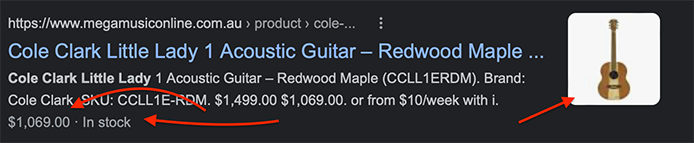
In the above screen capture, a search for a guitar on google shows us structured data in action. The product image, the price and the fact that the item is in stock, is all understood by Google.

Enhances Search Snippets

JSON-LD structured data also enhances the appearance of your website’s search snippets. Search snippets are the small snippets of information that appear under your website’s title and URL on search engine results pages. By adding structured data to your website, you can improve the appearance of your search snippets and make them more appealing to users. You see examples of this on more and more searches. Search for a recipe and you’re sure to see a picture of the finished result.

If you’re not sure how to implement JSON-LD structured data on your WordPress website, there are many plugins available that can help, including the popular Yoast SEO plugin. We tend to use this as well as a dedicated plugin that allows us to control the structured data for different types of content within the WordPress site.

What does JSON-ld code look like?

Here’s a simple example of how you can use JSON-LD to provide information about a local business:
<script type="application/ld+json">
{
"@context": "http://schema.org",
"@type": "LocalBusiness",
"name": "My Local Business",
"address": {
"@type": "PostalAddress",
"streetAddress": "123 Main St",
"addressLocality": "Mytown",
"addressRegion": "Mystate",
"postalCode": "12345",
"addressCountry": "USA"
},
"telephone": "555-555-5555",
"geo": {
"@type": "GeoCoordinates",
"latitude": 37.7749,
"longitude": -122.4194
},
"image": "https://www.example.com/images/mybusiness.jpg",
"priceRange": "$",
"openingHours": "Mo,Tu,We,Th,Fr 09:00-17:00",
"url": "https://www.example.com/",
"sameAs": [
"https://www.facebook.com/mybusiness",
"https://twitter.com/mybusiness",
"https://www.linkedin.com/company/mybusiness"
]
}
</script>

In this example, we’re using the LocalBusiness type and providing information about the business name, address, telephone number, geographic location, image, price range, opening hours, and social media links. We don’t generally recommend creating JSON-LD manually like this, our recommended plugins do all the heaving lifting in creating and validating the code. But, it’s good to get a feel for what it looks like!

WordPress Performance: a checklist of things to speed up your website

Peter Shilling · Feb 11, 2023 · Leave a Comment

WordPress, out of the box is a great platform for most website builds. A finished WordPress site however still needs to be configured to run quickly. Fast page loads are important for a modern website. Your visitors are quick to move on when pages take time to arrive, particularly those browsing on mobile devices. Page speed is also important for your WordPress site’s SEO rankings.

At The DMA, each site that goes live is tuned for speed. More recently we’ve been even more fastidious about this. It’s our job to ensure that each site we launch loads like a rocket!

In this article we’re going to share some of the areas that we look at to keep things running quickly.

Image optimisation within WordPress

This is probably the big one for a lot of sites. Not just at initial launch but over the life of the website. It doesn’t matter how fast your hosting is, how good your caching is…. If you’re trying to deliver images that are just too large, (think file size) you’ve got a performance problem.

Check out this article Improve WordPress Performance by optimising images to get up to speed on performance hacks around images.

WordPress Caching

WordPress works by storing the content (think your text, categories, tags etc.. ) in a database. When a visitor loads a page, the web server queries the database for the relevant content, builds the page and send it to the visitor’s web browser. 10 seconds later, someone else visits the same page. The same process happens. There is a lot of overhead here and the whole thing takes valuable time.

Caching is all about storing copies of these pages so that when the second (and third and one millionth!) visitor arrives they see a copy of the page instead of all the work to talk to the database and build it on the spot. Caching comes in many different flavours. Years ago it was common to install plugins into WordPress that would take care of this. More recently it’s easier to go for hardware or network available caching. In English? Get other cloud based computer to store the copies of these pages.

We work alongside best of bread hosting outfits like WP Engine and CloudFlare. Together we’ve put together a WordPress tuned hosting system that can scale up to many millions of page loads each month. Each one them as fast as possible.

Even on a tight budget it’s now possible to access some amazing hosting setups that will allow your content to fly, chat to our team to learn more what’s possible here.

Content Delivery Networks (CDNs)

This is related to the above section on caching. In many ways the two go hand in hand. Once again years ago running a site on a CDN was an expensive business. Not now, it’s in reach of even the smallest website.

To understand what a CDN is and how it can really boost your website’s speed read this article WordPress hosting; time to add a CDN?

Optimising your code

Ok, so this section might get a little nerdy but it’s worth it. At least understand the concepts, then certainly chat to us about getting these things done on your WordPress site.

A web page is put together from a number of things. An HTML file (all of your content), one but probably multiple CSS files (these are style sheets that control the design, colours, layout etc.. ), other code like Javascript and then your images. Getting all of this to your user’s web browser as quickly as possible is a key part of any WordPress performance optimisation.

And, there are many tricks to it.

You can enable compression so that some of these files can be made smaller and therefore delivered over the network faster. Concatenating multiple files into one. This can be done with CSS and Javascript files so that the browser can make one request and get the entire payload in one go. Using sprites you can do the same with images. Put many different images together into one so that the browser only has to make one request over the network.

I’m not going to get into the nitty gritty of all this here. Suffice to say it can be complex but rest assured that those sites that perform well are almost certainly making use of these methods.

While there are others area that our team look at when working on a site these three areas are the big ones. If you have a problem with WordPress performance chat to our team about how we might be able to help.

Get your analytics inside your WordPress dashboard

Peter Shilling · Feb 5, 2023 · Leave a Comment

We’ve been building WordPress sites now for almost 10 years. In that time we have honed in on a set of plugins and tools that help us get the job done efficiently. We have a core set of plugins that we use on just about every WordPress project. One plugin that has undergone lots of changes over the past 12 months is our favourite Google Analytics plugin. It’s had name change, now it’s called Monster Insights. It was previously known as Google Analytics for WordPress. Our team have been using this plugin for many years to configure WordPress sites to track analytic data with Google Analytics.

What’s new in Monster Insights?

WordPress Google Analyitcs

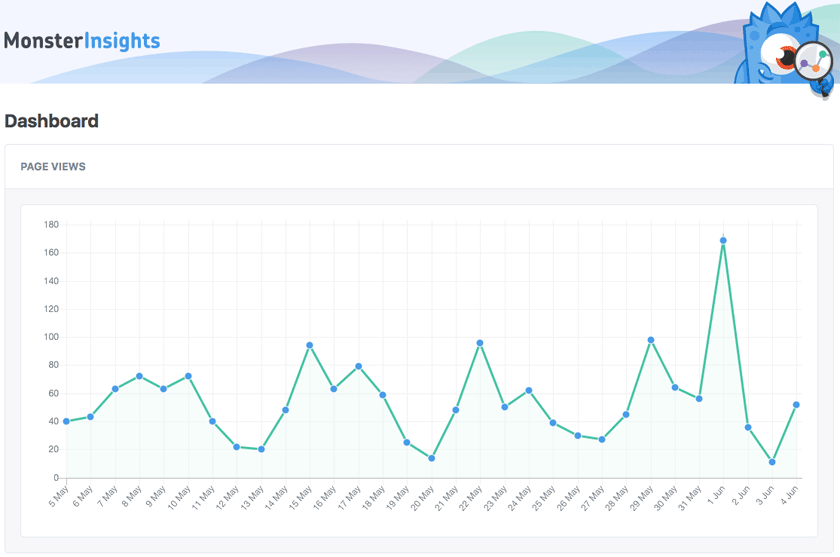
The plugin has received a fresh interface and a number of new tweaks. We think the best improvement is the display of Google Analytics data right inside your WordPress dashboard.

Clicking on the insights menu in the dashboard will show you the last 30 days of page views on your site. It’s the screenshot above. Hover your mouse over each point (not on the screenshot but in your dashboard :) ) will give you the number of page views for that day.

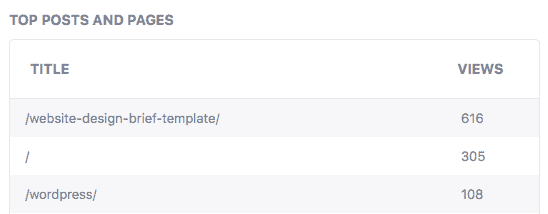
Google analytics top pagesBelow this there are two other tables of data. Top Post and Pages (pictured below) lists the URLs of the pages or posts with the most page views over the month.

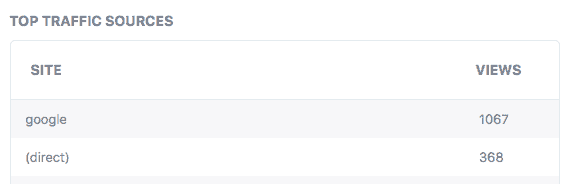
The second Top Traffic Sources shows the traffic sources over the past month. Ordered from top to bottom.

Sure, there is a lot more data in the full blown version of Google Analytics. And that’s fine. Login there to really drill into your statistical data.

What’s nice about having some top line stats inside your WordPress install is that you can quickly see how things are going from within the dashboard.

If you’re a DMA Managed WordPress hosting client, you will have the latest version of Monster Insights already running inside your setup. When you login into your WordPress dashboard look for the item “Insights“. That will lead you to the reporting that is pictured in this article.

Say hello :)

We'd love to hear about your WordPress project! Whether it's a rebuild of an existing website, a brand new website or you're looking for a team of WordPress professionals to consult on your project, we're here to help.

dma-logo-icon
help-for-wp-logo-dma-2
© 2026 The Digital Marketing Agency
  • Plugins
  • Privacy
Chat to us about your website project