• Skip to primary navigation
  • Skip to main content
dma-logo-icon
  • WordPress development
  • Managed Hosting
  • Portfolio
  • Blog
  • Contact
  • WordPress development
  • Managed Hosting
  • Portfolio
  • Blog
  • Contact
Say hello
Hide Search

Archives for April 2016

Is your WordPress site destined to fail from the beginning?

Peter Shilling · Apr 28, 2016 · Leave a Comment

In our years of building Building WordPress sites we’ve seen our share of failed projects. Happily though we’ve seen many many projects fulfill or surpass initial expectations.

The single factor that makes or breaks a website project, I believe, is the attitude and expectation of the business owner towards the website.

Let me explain. (Just bear with me on this one, it’s such an important point that I’m making I want to draw on an example).

A comparison that’s not as silly as you think!

Mary and John are starting a new business. A florist which they’ll setup in their local suburb. They scout around until the find an ideal location. They’re lucky enough to get into a retail building on a busy shopping strip. The rent will be a little more but the exposure will be worth it.

They put their savings together and have enough to do a great looking shop fit out. They’ve got display cabinets for their flower arrangements, bench tops to display their variety of gifts and a welcoming point of sale station.

John’s friend is a graphic designer who’s offered to do artwork for the signage. This means they’ve saved some dollars there but the production of the signs was still expensive. Mary has a friend in the city council and together they’ve organised for the shop to use some of the footpath. This enables them to have their flowers sitting outside the shop front to attract the attention of passers by.

In total they have to spend $15,000 on the shop before opening day.

Finally the first day arrives and the shop is open. Both Mary and John invite all of their friends. Everyone agrees it looks amazing. Stunning flowers fill every corner, and the variety of colours and skilful arrangements demonstrate that these guys really know their trade.

After their friends leave, the flowers outside on display do a great job of attracting customers into the store. At the end of the first week both Mary and John are very happy with progress.

The following week though, things start to change.

Mary does not have time to replenish the arrangements on the footpath. They both have other commitments and on Wednesday and Thursday they can’t man the shop so it stays closed.

Friday they open but only John can make it. Mary sends along her friend Michelle in her place. While John picked up fresh flowers at the market Michelle has never worked in a florist so she’s unable to make the arrangements look as good.

Ok, enough silliness!

It’s obvious, you can’t spend all the money on the setup and then do nothing.

Why then would you neglect your website?

Let’s pull together the comparison.

You spend money on the signage and the fit out of the shop, just as you do when building your website right?

You plan: “If a customer comes in the front door I want them to see our signature arrangements so we’ll put them on this table here”. This is no different to “let’s have a big button titled ‘our products’ on the top of the website so a user can easily visit the product section”.

Extras like the arrangement with the council to have your product on the footpath, are no different from getting your team to all write some new blog posts for the website launch. Content that will get indexed by the search engine and bring users into your website.

Prior to the launch, everything had to be perfect, every flower (read: every pixel) had to be just right. Why then is it ok a week later to have someone lesser throwing up sub-standard content on your website? Or worse still to have no new content at all on your website?

The answer to all these questions is simple: It’s not ok.

After the site is launched, you can’t stop turning up to work!

What’s your attitude to your website?

Earlier I made the point that I believe it is the attitude and expectation of the business owner towards the website that makes or breaks a website.  If you believe that you can build a website, launch it and then do nothing you’re destined to fail.

A successful website project is backed by people who know that the build is just the beginning.

We believe strongly in this slogan:

Make launch day the first day of your website project – not the last

…so much so that we use that as one of our key messages over at Assistant Press, our digital marketing training program for WordPress users.

Things are going to change, and adjustments will need to be done in response to how the site fares with real people interacting with it. New content needs to be added and visitors will have questions that need to be answered. All of this should be seen as an integral part of the project. Right up there alongside the graphic design and the functional layout of the website.

Hope you’ve enjoyed the thoughts, best of luck in your WordPress project!
New domain name options coming in Australia soon

Peter Shilling · Apr 20, 2016 · Leave a Comment

There’s an interesting announcement from auDA this week that is worth keeping an eye on. Firstly, a little background. auDA is the organisation that administers the .au name space, i.e. domain names that end in com.au, net.au, edu.au etc..

In short the announcement is that they are going to open up second level registrations for .au. So instead of resisting YourCompany.com.au you will be able to register YourCompany.au.

Shorter domain names, always welcome particularly in the mobile focused world we live in now. And this will also open up more names to be available for registration. Although how the policy is implemented will see exactly how that roles out. There is still policy development to be worked through, particularly around existing domain name owners. If you own YourCompany.com.au chances are auDA will give you the first option to register the equivalent YourCompany.au.

How that process works remains to be seen.

It’s possible that there will be more than one interested party. For example if someone owns xyz.com.au, someone else might have xyz.net.au. Both of these parties may well be interested in xyz.au.

If history is anything to go by there will be some kind of bidding process that will allow interested parties to bid on the new shorter option. In the meantime if you happened to own both xzy.com.au and xyz.net.au that might give you an advantage, who knows…

If you already own a .au domain name it’s certainly worth keeping up with the developments here so that you’re aware of the changes and if your given first bite of the cherry so to speak, you can jump on it.

YouTube: Turn off related videos in oEmbed WordPress URLs

Clair Gowenlock · Apr 19, 2016 · Leave a Comment

This is a follow up to the popular ‘Embedding videos into your WordPress pages or posts‘ post we wrote a while ago.

We often get asked how to remove the display of related videos. These are, by default,  shown at the end of their video when embedding a YouTube video URL in their WordPress site.

It’s actually quite simple.

All you need to do is add ?rel=0 at the end of your video URL like this:
http://www.youtube.com/watch?v=2yH5Q_z59JQ?rel=0

​WordPress uses oEmbed to get the embed code from YouTube.

Since you append the URL with ?rel=0, it fetches an embed code with suggested videos or recommended videos turned off.

5 Changes in WordPress 4.5 that will make your job easier

Peter Shilling · Apr 13, 2016 · Leave a Comment

The latest version of WordPress, 4.5, is set to be released this week. It includes several new features that make posting, editing and managing your WordPress site easier. Check it out and make note of these exciting new changes heading your site’s way.

New features in-line make drafting posts simple

Many of us spend the most of our time creating new content for our sites. WordPress 4.5 has added easy shortcuts in the text editor to easily add links, code, and other content into the field.

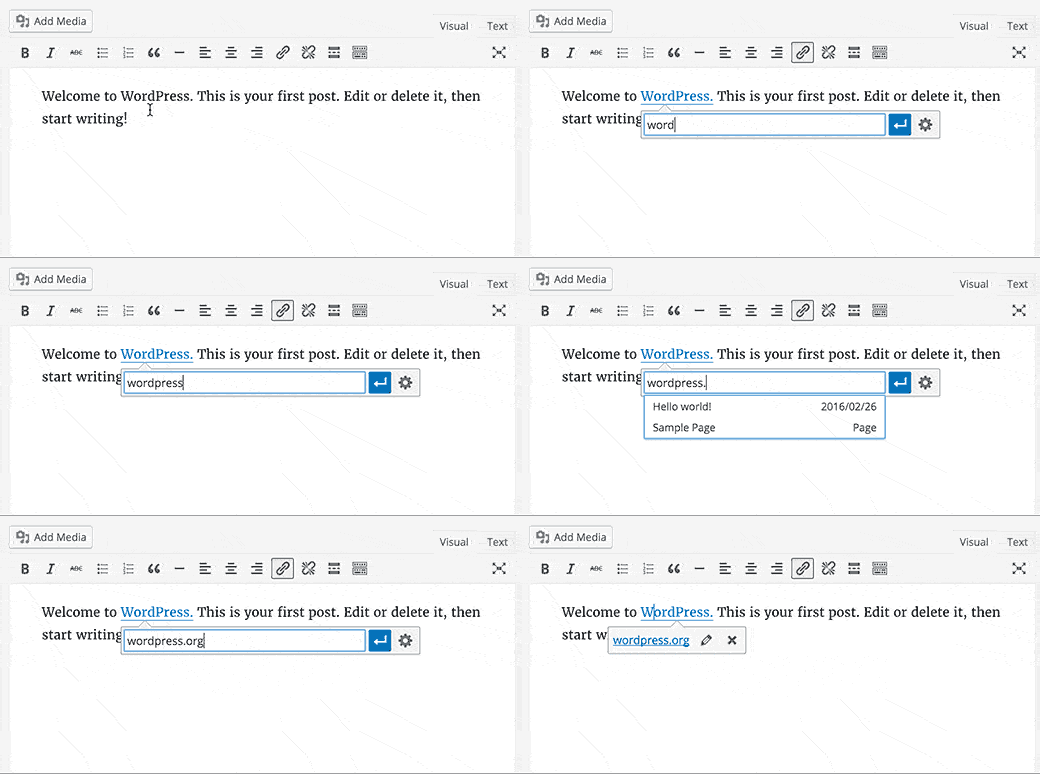
  • By highlighting text and pressing CTRL+K, a menu will show up that allows you type the link or copy/paste it in without breaking your flow!
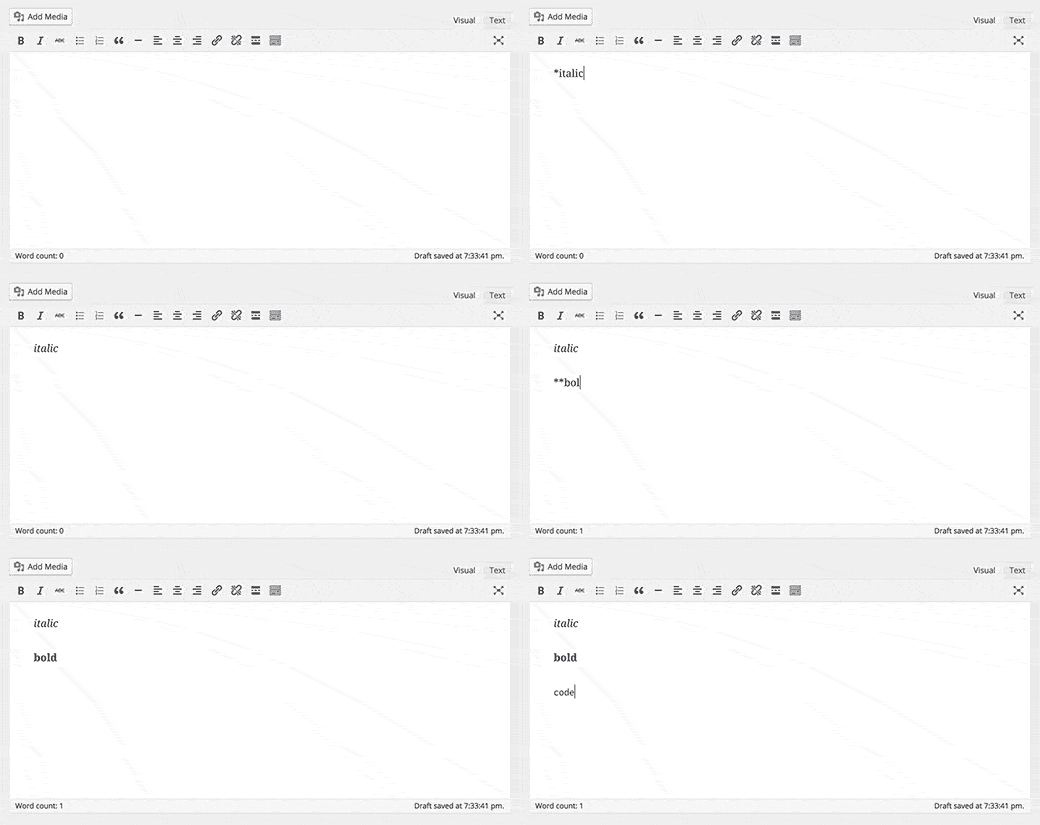
  • You can type *italic* or **bold** to make your text follow suit, instead of pausing to highlight and edit in the main menu
  • By typing `code` the text that you enter will be recognized by the editor as code, making it easier to embed code content in your site
image courtesy of WPBeginner.com
creating links (image courtesy of WPBeginner.com)
using markdown (image courtesy of WPBeginner.com)

Prefer the old-school way? Not to worry. You can disable these few features quickly and easily in the visual editor.

Images will automatically resize for screen sizes

The last time WordPress updated there was a new feature for images to automatically resize based on the size of the screen, which is great for responsive webpages and clients who have a lot of traffic from mobile and tablet devices. It makes the site load more quickly and use less data.

With this update, the features is taken a step further by optimizing the images even more, so the site will perform even better without compromising on the visual quality of the image.

You won’t have to do anything special to take advantage of this; it just happens! However we always advise to use web-optimized images on your site to begin with, so they’re as nimble and lightweight as possible.

Customizer is more customize-y

There’s two new additions to the customizer:

  • If your site is a responsive site, you’ll be able to see previews of what it will look like on desktop or mobile, just by clicking little icons on the bottom of the page. This only applies to themes that are responsive.
  • You’ll be able to add your own logo to the theme through the customizer, instead of having to go to the options panel, which makes it easier to change everything on your site visually in one place. This only applies to themes that support custom logos. 

You can finally login using your email address

Tired of forgetting your WordPress username? With this new update, you will now be able to use your username or your email to login to your account.

There’s no action to take here. You’ll notice after the update that the login field that once says “username” will now have “username or email” as a title, encouraging you to use either one.

Comments are easier to moderate

This is a small but powerful tweak to make it easier to manage conversations in your comment threads. Now, when you go to the Moderate Comment page, you will not only see the comment alongside its author, their contact info, and where it was posted. You’ll be able to see all the formatting around the comment – which means that it spells out where the commenter may be linking to, what they’ve bolded or underlined, and any images or other content they tried to embed. What’s even better is that from this screen you can edit the comment directly from this screen. Moderating has never been this easy.

Note: The DMA team will be testing the new version of 4.5 on your site and conducing the upgrade for you to the latest version, so when it launches you won’t have to worry about a thing!

Say hello :)

We'd love to hear about your WordPress project! Whether it's a rebuild of an existing website, a brand new website or you're looking for a team of WordPress professionals to consult on your project, we're here to help.

dma-logo-icon
help-for-wp-logo-dma-2
© 2026 The Digital Marketing Agency
  • Plugins
  • Privacy
Chat to us about your website project