• Skip to primary navigation
  • Skip to main content
dma-logo-icon
  • WordPress development
  • Managed Hosting
  • Portfolio
  • News
  • Contact
  • WordPress development
  • Managed Hosting
  • Portfolio
  • News
  • Contact
Say hello
Hide Search

Archives for June 2014

Our biggest WordPress launch week ever!

Peter Shilling · Jun 30, 2014 · Leave a Comment

We’ve been developing WordPress sites now since 2008, in that time we’ve launched over 200 sites. Last week though was the biggest launch week we’ve ever seen! During the week 4 new WordPress sites were unleashed on the Internet!

Obviously, it takes more than a week to build a site; each of these projects steadily worked through our production process it just happens this way that they sometimes all arrive at the finish line together.

There are some similarities in the projects:

  • They all are responsive, they look great on both desktop computers and mobile devices
  • Each one is built on the Genesis framework, our WordPress tool of choice
  • They are all hosted in our WordPress hosting environment; load them up in a browser and see how they perform!

Browse through the sites below our graphic design and development teams have done a brilliant job in bring each one of them to life!
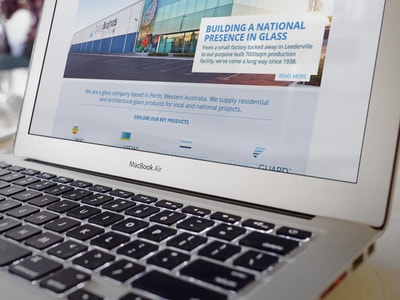
Cooling Brothers WordPress ProjectCooling Brothers

Based in Perth, Cooling Brothers have an awesome selection of photography that shows off their work.

It’s always easy to deliver a spectacular site when you have great assets to work with.

The site features some custom development to create the product section of the site and the project gallery.

Read more about this project here in our portfolio.

Devote Recruitment
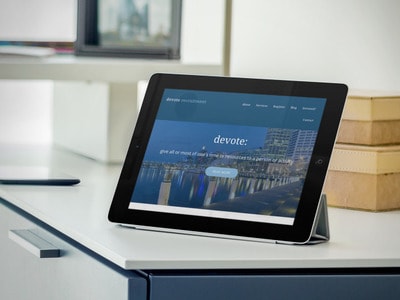
Devote recruitmentIt’s always exciting working with a new business and a new brand. It’s a chance for us to have an impact in the beginnings of what will be a successful long term project.

Devote is a new offering in the Sydney recruitment landscape specialising in sales and marking as well as accounting.

We worked on designing and building the site in WordPress and also produced the video that features on the home page.

Check out devoterecruitment.com.au to view the site.

Three Cheers Training

three-cheers-demoOn this project we worked with a team to assist in the rebranding of this training business. Formerly ModKnights, Three Cheers Training is the new brand that the business will use going forward.

Based in Sydney, Three Cheers specialise in specialised training for the hospitality industry around alcohol management services.

Working with a new logo that was developed for the rebrand we’ve come up with a clean and modern WordPress site to help re-launch the business.

View ThreeCheersTraining.com.au here.

Australian Road Journeys
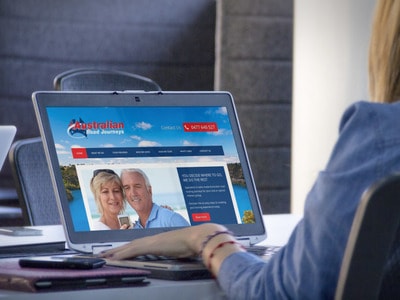
australian-road-journeysOperating in the domestic travel industry, Australian Road Journeys provide coach based touring services around the country.

The site features tour previews for some of the shorter and extended tours available as well as consistent calls to action for the user to make enquiries about the service.

Visit AustralianRoadJourneys.com.au to view the site.

Breathe new life into your WordPress site: start blogging

Peter Shilling · Jun 26, 2014 · Leave a Comment

This the third and final instalment in our blog series “Breathe some life back into your website”.  The idea being that we wanted to present some simple ideas that can help our clients get re-invigorated with their WordPress websites.

As the title says: start blogging!

If you’re not already adding regular content to your site this is probably the easiest thing you can do to bring some life back to your WordPress site. Google loves fresh new content, so as well as being interesting and current for your visitors it will help your search engine optimisation efforts.

More than likely your website is already setup with a blog or news section so there’s probably nothing to be installed or configuration required to get a start on this one.

Like anything else it’s a discipline to keep publishing content on your site, here are some quick ideas to help you get started.

Get others inside your business involved

Many of our clients have a stumbling block when trying to get started on this one, particularly with this questions: what should I write about? Talk to other people inside the business, start listening to conversations with fresh ears – there really is blog content everywhere.

For example take a situation where a custom service team answering questions day in day out. Often in a situation like that you’ll here things like “I get the same questions all the time, when will they learn!”. Right there, is a content opportunity. Take those pain points, the questions that every customer calls in with and write the answers in your blog.

Talk to your customer service team, perhaps even get them to draft some of the content. From their perspective they’d be happy if just one person reads it and consequently does not have to call and ask the question.

It doesn’t have to be all about you

Why not look at content that is relevant to your industry that’s in the wider news or current affairs. Take the opportunity to express an opinion about that. Perhaps how it affects you, your customers or others in the field that you work.

Use your blog as a mini soap box to publish your ideas

linkedinThis is a good opportunity to add to your profile and become known in the field that you work. If you use LinkedIn and have a lot of contacts within your industry, share this kind of post with your network. Your blog now becomes relevant to them, all of a sudden you’re top of mind with a much larger network of people.

Make your life easy, schedule content

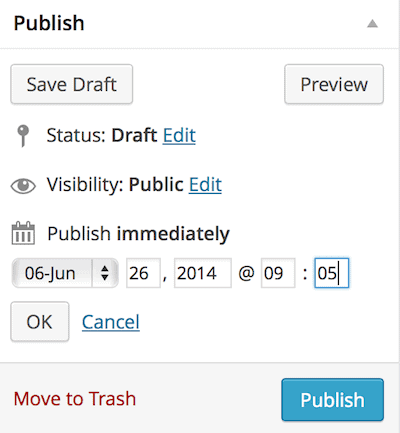
In our regular webinars I often talk about scheduling posts, if you’re pushed for time this is a great way to work. The idea is that you find some time perhaps even just once a month and during that session write a number of blog posts that you then schedule for the next period of time. WordPress will automatically post the content based your schedule.

schedule content in WordPressCreate a post in the normal way but instead of clicking Publish when you’re done, use the edit button next to Publish immediately and from there choose the date and time that you’d like the post to published. WordPress will do the rest when the publish date arrives.

Regularly content, easy!


This post is part of a 3 part series: breathe new life into your WordPress website. Be sure to check out the other two posts here.

Lead generation for your WordPress based site

Peter Shilling · Jun 24, 2014 · Leave a Comment

Your website is there to do a job, it should be working for you.

When working with clients on web projects I often use the metaphor of you website being an employee. In the same way that you wouldn’t hire someone and then just abandon them you shouldn’t launch a website and then just leave it be. It’s needs to be built upon, tweaked and tested for performance.

You should expect results from your web site investment

Lead generation is often one of the core functions and indicators of a good performing website. Perhaps it’s getting leads to your sales team, attracting users to sign up to your email newsletter or making a sale if your site does e-Commerce.

Optimise for lead generation

There is no one size fits all here. Every site is going to be different as the content and audience is unique. So let’s look at this in general terms, I’ll present just a couple of ideas to think about.

Make the call to action simple

I think I could fill a blog post with just this point alone. What ever it is that you want the user to do; fill in an enquiry form, signup to a newsletter etc.. make it simple.

  • Ask only the minimum number of questions
  • Make the form easy to find in the menus and elsewhere in your site
  • Consider putting the form inline with your content

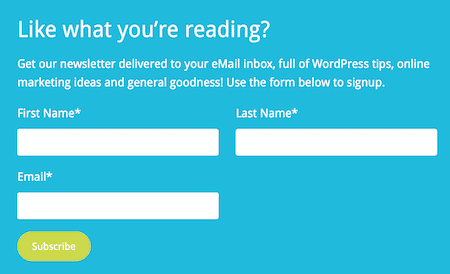
newsletter-signupThis example is from the our very own blog. At the bottom of each blog post (just scroll down you’ll see it!) we show the user a form to sign up to the our eMail newsletter.

Consider new ways of getting attention

We have been using a new WordPress plugin on a few projects lately called Opt-in Monster. While it’s primary focus is getting users subscribed to an eMail list, with recent updates it can be used more generally within a site.

It can show visitors a pop-up message, perhaps directing them toward your contact page or telling them about a special promotion that you have going on at the moment.

The clever thing about Opt-in Monster is that there is a lot of smarts in the background. Rather than annoying a user the moment that they hit your home page, you can show the pop-up message based on the visitors behaviour. For example, as they land on a specific product page show a message there or my favourite, show the pop-up just as a user is about to leave your site – giving you that last chance to win them over before they go.

The plugin also provides other tools apart from the pop-ups. You can have a call to action or sign up form that sits in the sidebar of the site or the footer as well.

Analyse the stats!

Whatever the tool you use you need to be looking at the statistics. Call me a data nerd but I can tell you how many leads we’ve had this week, is that number higher or lower than usual and probably have a general stab at why it’s better or worse than usual.

Over at our sister website HelpForWP.com we sell WordPress plugins. We get a lot of traffic from around the planet and we’re constantly trying new things to improve sales. It might be trying a new placement for the buy now button or showing people about to leave the site a discount coupon code via a pop-up.

None of these tweaks are worth doing if you don’t have an eye on the statistics to guide you if the change is making conversations better or worse.

We install Google Analytics on each site we launch, with a bit of know how and time to learn it all the information is there for you too.


This post is part of a 3 part series: breathe new life into your WordPress website. Be sure to check out the other two posts here.

Part three will be published 26th June.

3 ideas to breath new life into your WordPress website

Peter Shilling · Jun 23, 2014 · Leave a Comment

For many of our clients managing their website is just one part of their day to day responsibility. There is always a lot of other things competing for time and attention. Constantly coming up with new ideas for your website can be tough, so to save you a bit of time we’ve put together this short 3 part series “Breathe new life“, each post presenting an new idea that might be something that you could consider.

The idea being that if your site has been up and running for a few months or perhaps a couple of years, it might be time to freshen things up.

Breathe some life into your site and engage more with your website visitors.

Add a poll or survey to your WordPress site

We use gravity forms on just about every site we build.

As well as doing a great job creating contact forms it also has add-ons that allow you to easily add polls and surveys to your site. Both of these offer an opportunity to get some feedback from your visitors.

The screen shot below shows you a really quick survey that I’ve built with the plugin to give you an idea of how it looks.

sample-survey
A sample survey

Polls on the other hand can be something a lot more simple; perhaps just one question.

Either way, as well as being an easy tool to use, Gravity Forms does a lot more than just build the survey or poll. It’s capable of capturing the data and showing you some simple analytics for the responses coming in from your users. The data is also available to download in CSV format meaning you could do more complicated analytics in a tool like Excel or Numbers on a Mac.

Content ideas?

Generally when we sit down with a client to work on things like this the ideas flow quickly and easily. Ask questions on how visitors feel about your product or service, survey them on new features they’d like to see or collect feedback on their experience in dealing with your team.

Promote on social media

If you’re using social media to promote your content consider linking back to your site so users can participate in your new poll or survey, the result: attracting new users to from Facebook, Twitter, LinkedIn or Google Plus.

If you’re interesting in learning more about how to do this, book a training session with one of our WordPress pros today. We can organise to install the add-on for you and then proved a training session on how to use it.


This post is part of a 3 part series: breathe new life into your WordPress website. Be sure to check out the next two posts around lead generation and regular blogging. Part two will be published 24th June and the final instalment 26th June.

Say hello :)

We'd love to hear about your WordPress project! Whether it's a rebuild of an existing website, a brand new website or you're looking for a team of WordPress professionals to consult on your project, we're here to help.

dma-logo-icon
help-for-wp-logo-dma-2
© 2026 The Digital Marketing Agency
  • Plugins
  • Privacy
Chat to us about your website project