• Skip to primary navigation
  • Skip to main content
dma-logo-icon
  • WordPress development
  • Managed Hosting
  • Portfolio
  • Blog
  • Contact
  • WordPress development
  • Managed Hosting
  • Portfolio
  • Blog
  • Contact
Say hello
Hide Search

Archives for November 2013

Flat design is coming to your WordPress Dashboard

Peter Shilling · Nov 22, 2013 · Leave a Comment

Our managed WordPress client’s have only recently had their sites updated to version 3.7, today the news is that WordPress 3.8 is coming soon.  The scheduled release date is December 12th.

A new WordPress Dashboard design

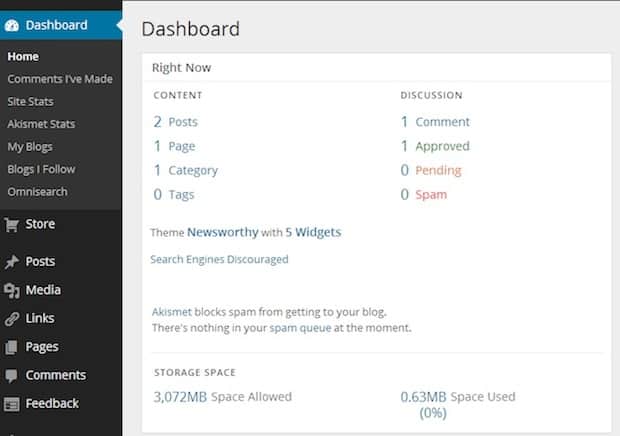
While many users probably did not even notice the update to 3.7 you definitely will notice the 3.8 release as the key feature in this release is a complete rework of the WordPress Dashboard. The WordPress development team have been focusing on a new design that incorporates much better responsive properties, meaning that it performs well on devices from desktop computers right down to smartphones.

Editing your WordPress site on that iPad or iPhone will be a whole lot easier right in the standard dashboard.

Everything is going flat!

If you’ve recently updated your iPhone or iPad to iOS7 you’ll know what flat design is all about.

iOS flat design

Seems like everything tech is loosing weight at the moment and the WordPress Dashboard is going to go the same way with the update to 3.8.
wordpress-3-8

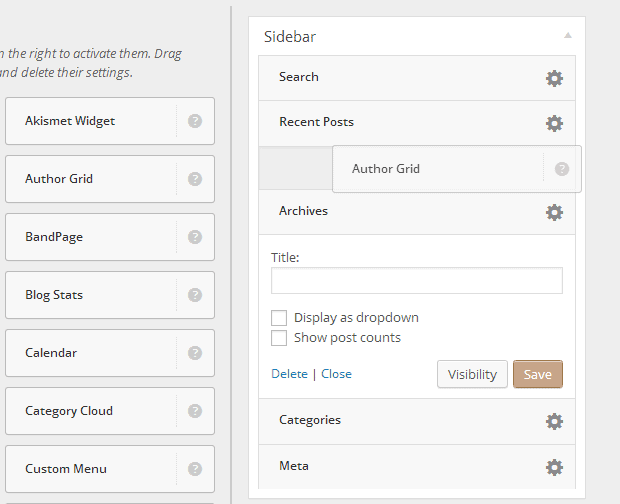
As with most releases, 3.8 has a lot of issues resolved, most are under the hood but one other that users will definitely notice is the improvements in the widget area.

Picture below, the new widget area aims to make the control of WordPress widgets a lot easier.
wordpress.3.8.widgets

We’ll be notifying our managed clients here on our blog before conducting the update to 3.8 to ensure you know that is happening to your websites.

The humble Meta Description

Peter Shilling · Nov 12, 2013 · Leave a Comment

We all spend a lot of time focusing on search engine optimisation for our WordPress sites including the dreaded question – how do I get on page 1 of Google results?

It’s worth taking the time to consider how you look once you do get found on Google.

Enter the Meta Description

In short, the meta description is the text that shows up under your page title when your web site is shown on a search engine result page.

Here’s an example.

Example SERP result

The purple text is the page title, the black text is your meta description.

Some time ago I wrote an article Look your best on search engine result pages, it walks you through the technicallities of setting meta descriptions on each of your WordPress pages and posts.

It’s a good read to brush up on that skill.

The art of writing the meta description

I came across a blog post that I wanted to share, it discusses the intricacies writing meta descriptions. So with the above information on how to insert them into your WordPress site, have a read of this post by Tim Aldiss – 33 examples of great meta descriptions for search – it’s well worth the few minutes it’ll take you to read, you’ll get some good tips that can be implemented on your own web sites.

Tools we use: Trello – online project management

Peter Shilling · Nov 10, 2013 · Leave a Comment

From time to time I like to share some of the great tools we use to operate here at The DMA. The most recent post around this topic looked at HelpScout, our email system.

Today I’m going to tell you about Trello.

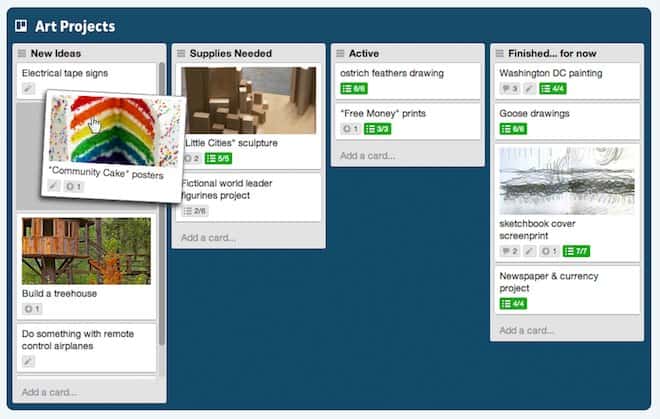
Put simply Trello is a cards based tool to organise (well as they say) anything.

It uses the metaphor of a card that can then be moved around, perhaps moved from a “to do” section to an “in progress” one – and that’s the way we use it to keep track of all the projects that we have.

trello-card

The cards can have comments placed against them, check lists even file attachments (PDFs/images etc.. ). Trello supports multiple users and has a very simple system for sharing a board with one or more users that might be working on a project with you. Users can then be assigned to specific cards, perhaps the ones that they are responsible for or working on at the moment.

What makes it different?

The key part of Trello is that while you can use it as a project management tool, it’s not only that. In fact it’s just a card / board system that you could use for all kinds of things.

Most project management tools force a workflow on you, I’ve used a lot of the common ones and it’s refreshing to just be presented with a tool that you can choose how to use it.

What else can you do with it?

Well really it’s up to your imagination. We have successfully used Trello as a project management tool but we also use it to track new features in the WordPress plugins that we publish. So in this context we have for each plugin an ideas column where we store things that we may include in the plugin. An in progress column for features that we’re actively working on, then a completed column for things that have been done and published.

Because each card is a feature that we’re adding to the WordPress plugin and we document our progress on the card, how it was done, perhaps dependencies that exist etc.. it also serves as a good record of when and how each feature was implemented.

How do I access it?

Firstly it’s a web based tool. Once you have an account up and running though there is also an iOS app for iPhone and a larger screen format for iPad. From each of these you can access your account and work on your cards and boards from anywhere.

How much does it cost?

It’s free with the option to upgrade to paid plan. We have been using the free option for over a year now and the features that it bring are all we need. The paid options give some nice features but for many they’re really not essential. The ability to mange permissions and what people can do with cards, integration with Google apps and a bulk export are all features of the paid version, which checks in at $US25 a month.

More information?

Check out the Trello web site here and in particular visit their tour page, they walk you through most of the man features with some good looking screen shots.

Enjoy!

Say hello :)

We'd love to hear about your WordPress project! Whether it's a rebuild of an existing website, a brand new website or you're looking for a team of WordPress professionals to consult on your project, we're here to help.

dma-logo-icon
help-for-wp-logo-dma-2
© 2025 The Digital Marketing Agency
  • Plugins
  • Privacy
We are aware of a scam using our website on WhatsAPP
We do not hire via WhatsAPP Please ignore any approaches you might have.