• Skip to primary navigation
  • Skip to main content
dma-logo-icon
  • WordPress development
  • Managed Hosting
  • Portfolio
  • Blog
  • Contact
  • WordPress development
  • Managed Hosting
  • Portfolio
  • Blog
  • Contact
Say hello
Hide Search

Archives for November 2016

The look of your WordPress website impacts on brand and sales

belinda · Nov 29, 2016 · Leave a Comment

You don’t need to be a graphic designer to maintain your WordPress website. This is one of the many wonderful things about opting for WordPress—this CMS allows you to easily add new pages and posts, as well as featured images, without much fuss.

WordPress sites are built using Themes. Themes control the branding and layout for your website. It may be that you’ve built your own bespoke theme from scratch to exactly suit you. Perhaps you’ve used an existing theme and been able to tweak it to your needs.

Whichever path you’ve chosen, the longer term challenge is in maintaining the look and feel of this Theme and the content you publish inside of it. We regularly see a lot of businesses go wrong in this respect. When they start adding new pages and posts, they neglect to stick to high quality of content layout that was there when the site was launched. The end result? A website that can look poorly laid out, messy, inconsistent and to put it bluntly, a bit like a dog’s breakfast.

A website that lacks consistency impacts on brand and sales

This has far greater implications on your business than a lot of people first realise. From a marketing perspective, your website reflects your company’s brand. You start diluting your brand with a website that demonstrates a lack of consistency in its appearance. That’s where you can start to run into trouble. Customers may begin to view your brand in a negative light. They might also wonder about the quality of your products and services.

A website that lacks consistency also has the potential to directly impact on sales enquiries. As well as communicating your brand, your website acts as a sales tool. If your website’s appearance is lacking, potential customers are less likely to pick up the phone or make an online enquiry.

It doesn’t seem fair does it? You could be the best at what you do but because your website doesn’t look quite right, customers think less of you. You’re an expert at your business, not at websites or WordPress.

Give your WordPress site the focus it deserves

When you first built your site, like most you probably poured over every detail. When you’re maintaining it, you should have the same focus. Care about what each and every page looks like. Go to the trouble of illustrating your content with a photo. Pay attention to the layout of your copy.

If you’re a DMA client chat to us if you need help in laying out content in WordPress. We’re available to do this for you if that’s your preference or at least give you some extra training or quick tips to keep your site looking its best.

Secure WordPress: the path to encryption on the web

Peter Shilling · Nov 25, 2016 · Leave a Comment

Running a secure WordPress instance under HTTPS is now an important optimisation for your website. It is a ranking signal that Google uses in its algorithm. Sites that run securely are getting a leg up in searching engine rankings. HTTPS is also mandatory to use the latest version of the HTTP protocol – HTTP/2. Here at The DMA we have been working hard on bringing a cost effective and quick implementation version of HTTPS to our managed WordPress hosting customers.

If you’ve read that first paragraph and you’re now thinking “what is all this techno mumbo jumbo” fear not. This blog post is written for WordPress website owners not tech geeks. I will explain!

What is HTTPS?

You might not know the acronym but you have surely seen it in action. Moreover you’ve probably learnt to look for it. In your web browser (Firefox, Chrome, Safari etc.. ) when you visit a website that is running under HTTPS, you’ll see a locked padlock display near the address. Each web browser looks a little different, below is how it looks on Safari.

secure WordPress SSL

When you visit your bank’s website, or your at the checkout in an online store you’ll see HTTPS in all of these places.

So, what is it. In short, it’s all about encryption. Traffic flows between the web server of the site your visiting and your computer’s web browser. Normally (i.e. HTTP – not there’s no S in there), this traffic is in plain text. Not secure in anyway. Anyone that has access to your internet traffic (for example your ISP) could (if they wanted to) see all of the content that is going back and forward.

If you’re in a cafe using a WIFI service your traffic is potentially available to other  users enjoying their coffee and morning snacks too.

HTTPS solves this by encrypting traffic that flows between the web server and your computer. While the actual data is still available to eavesdroppers, what they’ll see is encrypted gobldy-gook (yes that’s a technical term).

For many years now, it’s been best practise to use HTTPS for sites where there is any sensitive information at all. Think online banking, eCommerce stores or sites where users are expected to sign in with usernames and passwords.

Google is pushing for an encrypted web

As mentioned in the introduction of this article, Google has been using its weight to push the world wide web to a place where much, if not all of the traffic is encrypted. Back in 2013 Google announced that it would begin to encrypt all searches and results on its search engine. That had immediate effects on digital marketeers, no longer could we easily access statistics relating to keywords searches on websites. More recently Google stated that HTTPS is now a ranking signal. Meaning a website running under HTTPS will receive favour in the eyes of the Google search algorithm.

Watch one of Google’s keynotes here where they explain in detail (yes it goes for 45 minutes but that’s what the fast forward button is for, you can skim!) their thoughts behind HTTPS Everywhere.

Google Chrome’s 2017 update

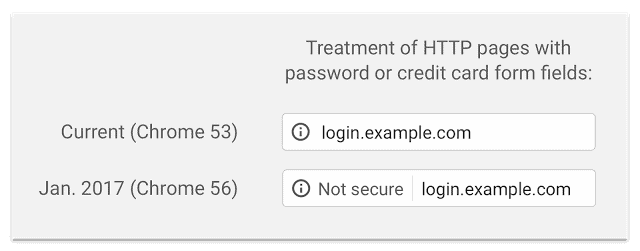
Earlier this year, Google announced that from early 2017 its Google Chrome web browser would display websites not using HTTPS as insecure in certain situations. Below is a screen shot from that announcement where they show the difference in the address bar, the current version at the top and that which is coming soon.

chrome-http-warning

The obvious effect of this is that visitors to your website will see the second message “Not secure” and make of that what they will.

What is HTTP/2 and how is it related?

This is surely turning into the acronym edition of The DMA blog. HTTP is the protocol (it’s the language two computers use!) that your website uses to transfer content to your users, in their web browser.

There has recently been an update to a new version that is dubbed HTTP/2. I’m not going to tire you with the technicalities of the update, you can see the FAQ here if you’d really like to read up on the geek stuff.

What you do need to know about HTTP/2 is that it’s faster than its predecessor. Your website is capable of loading faster when served from a hosting environment that supports HTTP/2. Here at The DMA we are now able to offer HTTP/2 to customers. You do need to also run under HTTPS so we’re offering both of these technologies together.

Secure WordPress – in summary…

  • Setting up a secure WordPress site, using HTTPS with an SSL Certificate is a good idea
  • It will aid your search engine rankings (although you still need to do other things like regularly publish new content on your site)
  • If your site runs with HTTP/2 as well HTTPS there is a performance enhancement to be had
  • If you’re a DMA managed WordPress hosting client we’ll be contacting you soon with information on upgrading your hosting environment to a secure WordPress install

Ideas to help you publish regularly on your WordPress blog

belinda · Nov 25, 2016 · Leave a Comment

Perhaps you already understand that regular content creation is important for your business. You appreciate it can help boost your website’s SEO rankings and improve your company’s visibility. You get all that.

What you’re finding harder to get your head around is the content, and you might be asking yourself: what do I write about?

It’s a common concern but surprisingly once you get into the habit of regularly creating content for your WordPress site, it actually gets easier.

Blogging Content Ideas

Here’s a list of some of the things you can include in your company’s blog or news section:

  • new product news
  • new client wins
  • behind the scenes / staff profiles
  • updates on the latest developments in your industry
  • comment pieces prompted by media coverage of your industry
  • industry forecasts and trends / what’s hot / what’s next

By blogging regularly, you’ll find you naturally start to identify good ideas for content as you’re doing your day to day job. You’ll see situations in a new light and start to think “hey there’s a blog post in that“.

Be sure you have a special place you can make a note of these ideas, because experience has shown us that if you don’t write them down when they occur you won’t be able to remember them later! We have written about this topic a few times here on The DMA blog, check out this post to begin with for some further reading – How to efficiently manage your small business blog. If you’re looking for even more try this one too – Tips to make adding regular content to your website a breeze.


Why your website needs keyword research

belinda · Nov 4, 2016 · Leave a Comment

There’s no point investing in a website if no one is viewing it. But how do you attract visitors with a view to converting them to sales? We’ve already spoken about why fresh, regular content is imperative for the success of your website but now we’re going to tackle basic SEO ideas.

SEO or Search Engine Optimisation is a fancy term that describes how visible your website is on search engines like Google in the natural or unpaid search results. Of course you want to be on the first page of rankings, as high up as possible, but how do you achieve this?

Develop a keyword strategy

This is not as scary as it sounds! We usually recommend selecting 8 – 15 keywords. They may not always be words, but could also be relevant phrases.

How do I know I’ve selected the right keywords?

You don’t. Selecting keywords is not an exact science, but you can ensure you do your research first. There’s a few different ways to approach selecting your keywords.

  • First, come up with a list of keywords that you think are relevant to your business
  • Next, do some Google related searches yourself to see if you’re on the right track
  • When you type in the Google search term, start with one or two words and see what Google completes for you in the search bar. This can often be a useful way of indicating what words or phrases are popular
  • Consider the number of results when you do a search. This will show you how many other web pages respond to that search term and give you an idea of what sort of competition you are up against
  • Another nifty tool to help you out is Google Trends (www.google.com/trends/) Here you can enter your search term and see how it’s trending. You can filter based on location and year, too.

We usually recommend popping your prospective search terms into a spreadsheet and applying a simple ranking system based on the results of the bullet points above. Once you’ve done this, add them up and compare your search terms to see which ones performed best, then select 8 – 15 of them.

If you’re unsure about any or all of this, our course Search Engine Optimisation for WordPress might be worth a look. The first section of the course dives into all the skills you need to do this work for your website.

I’ve got my keywords, now what?

Put them into action! We recommend sticking to your newly developed strategy for a solid few months at least. Get started in developing new content for your site, blog regularly and of course optimise all of your existing content.

Say hello :)

We'd love to hear about your WordPress project! Whether it's a rebuild of an existing website, a brand new website or you're looking for a team of WordPress professionals to consult on your project, we're here to help.

dma-logo-icon
help-for-wp-logo-dma-2
© 2026 The Digital Marketing Agency
  • Plugins
  • Privacy
Chat to us about your website project