• Skip to primary navigation
  • Skip to main content
dma-logo-icon
  • WordPress development
  • Managed Hosting
  • Portfolio
  • News
  • Contact
  • WordPress development
  • Managed Hosting
  • Portfolio
  • News
  • Contact
Say hello
Hide Search

Archives for September 2014

Embedding videos into your WordPress pages or posts

Clair Gowenlock · Sep 16, 2014 · Leave a Comment

It’s really easy to embed videos that you’ve published on YouTube or Vimeo* into your WordPress website. All you need to do to embed something into a post or page is to paste the video URL into your content area.

Make sure that the URL is on its own line and not hyperlinked (clickable when viewing the post/page).

WordPress video embed instructions

Navigate to the page or post you want to add the video to. In the content editor position your cursor on a new line where you’d like to insert the video.

In a new window in your browser go to the video (e.g. on YouTube or Vimeo). Copy the URL from your browser. The URL will look something like this: http://www.youtube.com/watch?v=2yH5Q_z59JQ.
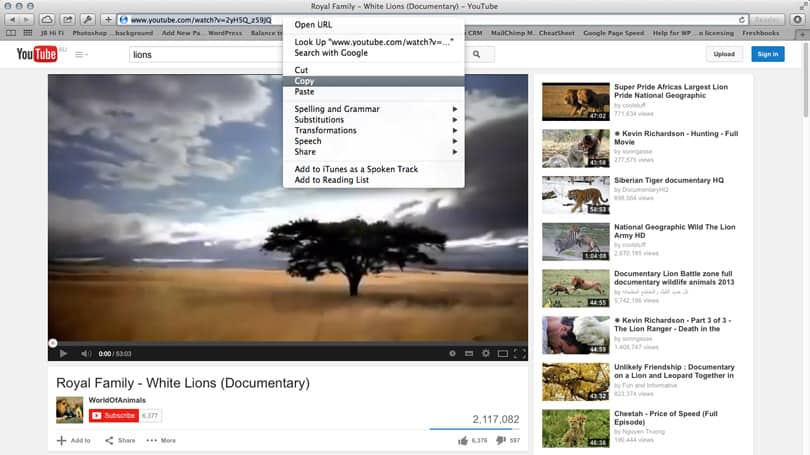
video-embed-copy-url-youtube

Go back to the WordPress page/post content editor and paste the URL into your content, ensuring it’s on a separate line.
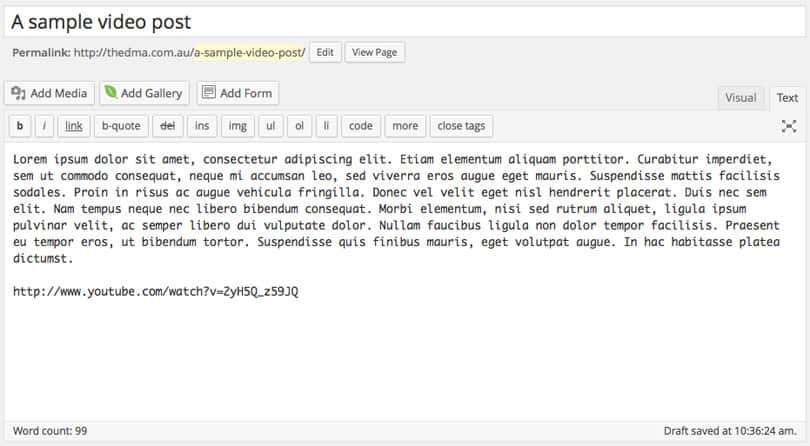
video-embed-paste-url-wordpress-content-area

Note in WordPress 4.0, in the visual tab of the content editor, you can preview the video. In older versions of WordPress you will simply see the video URL.
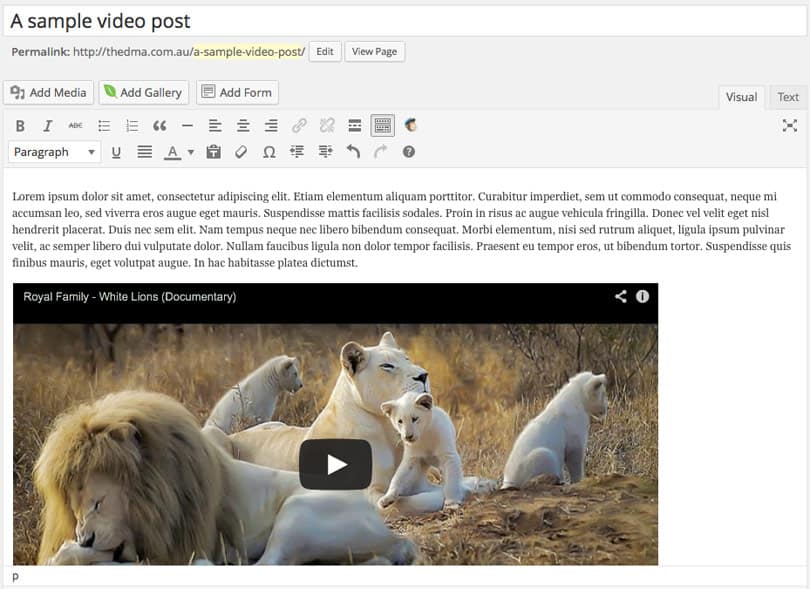
video-embed-wordpress-4-video-preview

Update your page or post and then voila, the video is now embedded. Check out the results on the front end of your website by viewing the page or post.

*YouTube and Vimeo are probably the most popular and common video sharing platforms that our clients use, however WordPress supports this embed functionality for a whole host of other platforms. You can view the full list of supported platforms on the WordPress codex under the ‘Okay, So What Sites Can I Embed From?’ heading.

Removing related videos from the end of a YouTube video

We’ve published a post over here showing you how to remove related videos from displaying at the end of a YouTube video when embedded using WordPress oEmbed.

The two faces of Google – how to be found on search engines

Peter Shilling · Sep 8, 2014 · Leave a Comment

Often when we are building a new WordPress site, somewhere in the throws of the process we’ll be asked “so when it’s online, how do we get onto the front page of Google?”

Fair enough question too.

There’s no point in doing all the work that’s entailed in launching a website only to find no-one can find you.

In this post, I’m going to cover two of the most common answers to the question. Keep reading though as toward the bottom I’ll also discuss how the two ideas can be used together.

There’s not a one size fit’s all answer to the question but usually the advice covers these two main ideas.

Google Adwords

If you really want to get on the front page of Google, now, you need to consider Google Adwords. I’m sure you’ve seen these ads, they are displayed as the first three listings on a search result page and then another group of ads will be displayed down the right hand sidebar of the page. See below for a screenshot the items with the yellow “ad” next to them are just that.

cat-insurance

Adwords works by charging the advertiser (you) a small fee every time someone clicks on your ad. The system is also known as PPC or Pay Per Click. The fee depends on the keywords that you use and how much competition there is for those words. In your ads you specify which keyword you would like to buy and then bid on those words.

Measure your success

To be successful using Google Adwords you need to engage someone to setup the accounts, the ads and the campaign. Best practice is also put in place a system to measuring the results of the campaign. Track the number of visitors that are coming into your site, how many of them are doing something (that might be; making a purchase, sending an equity or perhaps signing up for a newsletter) and then form a view on the financial success of what you’re doing.

You need to know, that if you’re spending $200 exactly what kind of return you’re getting

Chances are, most of the tools for this you already have in place. Google Adwords, we set that up for every site that we build and Gravity Forms is our weapon of choice for building and tracking forms and enquiries in WordPress.

In short, using Google Adwords you can get traffic from Google almost immediately. It does pay to plan a little and definitely understand what you’re trying to achieve.

Oh you’ll need a budget to spend on the ads.

Content Marketing

An alternative approach is content marketing. I’ll say alternative for the moment but below, there’s a good argument for considering both of these options together for a time.

Content Marketing is mostly about blogging. Adding fresh, new, keyword rich, relevant content to your website. Regularly.

If Adwords is the hare in this story content marketing is the turtle

Google loves to see regular new content on a website. Outside Google not many know how the ranking algorithms work but one thing for sure is that sites that always have new content do better than those that do not.

Read more about content marketing in this post: Content Marketing for the uninitiated

Using both strategies together

Good Adwords is a quick fix, you can opt to buy keywords and be visible on Google now. Content marketing is something that is going to take time. For a new website you could choose to use both strategies together. The idea being that Adwords will get you a result now while you work your way up the natural search results by producing a lot of content on your site.

Adwords costs you money, content marketing costs you time

Of course time also costs you money, but if you learn the basics of content marketing this is something that many website owners or marketing teams can do themselves. The ultimate goal is that your natural search results will get to the point where they are doing so well that you can turn off the Google Adwords spend.

Just last week I reached this point with a client that we work with on an ongoing basis. Doing a Google search for many of their keywords resulted in the Adwords ad showing up first and then their natural result showing up directly below it; at placement number 1.

Say hello :)

We'd love to hear about your WordPress project! Whether it's a rebuild of an existing website, a brand new website or you're looking for a team of WordPress professionals to consult on your project, we're here to help.

dma-logo-icon
help-for-wp-logo-dma-2
© 2026 The Digital Marketing Agency
  • Plugins
  • Privacy
Chat to us about your website project