• Skip to primary navigation
  • Skip to main content
dma-logo-icon
  • WordPress development
  • Managed Hosting
  • Portfolio
  • News
  • Contact
  • WordPress development
  • Managed Hosting
  • Portfolio
  • News
  • Contact
Say hello
Hide Search

Archives for October 2013

Where are my Google keywords?

Peter Shilling · Oct 18, 2013 · Leave a Comment

We use Google Analytics for each WordPress site that we build. When training our clients, specifically around Search Engine Optimisation for WordPress we have relied on the keyword tools in Google Analytics to demonstrate traffic generated per keyword.

Over time, using the keyword section in Google Analytics you were able to see the search terms used when a visitor found your site on Google and clicked through to visit it.
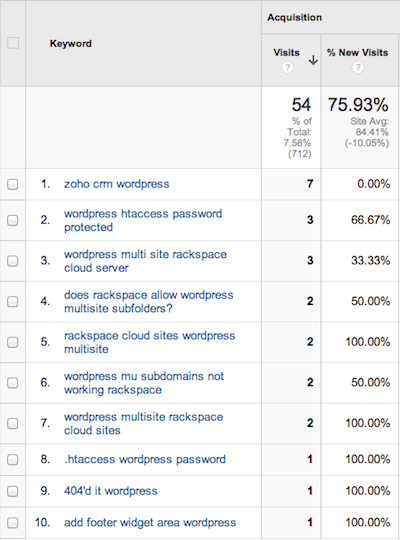
google analytics keywords
See the screenshot here; this is showing all the keywords for a short period and the number of visits.

This tool worked hand in hand with your keyword strategy, where you’ve focused your efforts on optimising your WordPress site for a number of specific keywords and phrases.

The idea being, you implement the strategy and then use the tool to see it in action.

What’s changed?

This ability has slowly been changing. In 2011 Google started to encrypt the searches for users in the US. This has since been slowly rolled out to users in all other countries.

In September this year crunch day came, Google has now begun encrypting all searches for all users.

This means that the tool in Google Analytics will now not show any keywords for Google organic searches. (NB. If you’re buying Google Adwords you’ll still see those keywords)

What’s the solution?

Well,there is another Google tool called Webmasters Tools that you can use to test the success of your keyword strategy. 

If you’re a client for whom we’ve built a WordPress site you’re in luck because as part of our Go Live process we setup your site in Webmaster Tools.

In some ways Webmaster Tools is actually more simple with the information that it provides. The screenshot below shows some basic stats about the traffic you’re getting from Google organic search.

google-webmaster-tools

If this is new to you, Impressions is the number of times your site has shown up on a search engine result page, while Clicks is the number of times that someone has clicked on that result to visit your site.

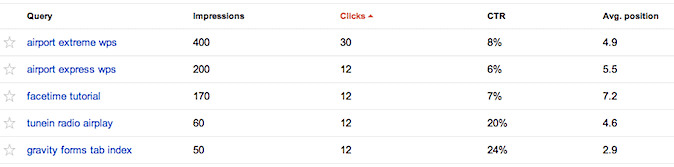
Then the tool goes on to show you statistics like this.
WordPress and Google WebMaster Tools

Here I can see the search query, impressions, click through ratio and the average position that my site is displayed on the search result page. All good information and very relevant to see if the keywords and phrases that you have optimised your site for are starting to work for you.

While you can see all of these great stats you can’t see what that particular user did when they arrived at your site, which you could using Google Analytics.

Where to find these stats
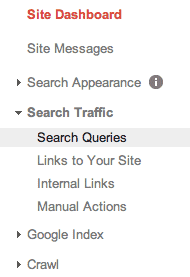
google webmaster toolsLogin to Webmaster Tools, then choose your site out of the main list.

You will then see the Site Dashboard menu (see screenshot opposite). Open up Search Traffic and in there you will see a menu item Search Queries – that’s where you’ll find the statistics outline in this article.

How to learn more about WordPress and SEO

If you’re keen to increase your WordPress site’s search engine optimisation keep an eye on our regular webinars. They are free to DMA clients, check out the latest ones here.

Further reading & links

  • Login to Google Webmaster Tools here – https://www.google.com/webmasters
  • Search Encryption Raises Bar – blog post by Jon over at CrossCutbay.com
  • Goodbye, Keyword Data: Google Moves Entirely to Secure Search – blog post by Thom Craver at Search Engine Watch
Marketing your location specific business in the digital world

Peter Shilling · Oct 10, 2013 · Leave a Comment

Last weekend we were gifted with an extra day off for labour day in New South Wales. Like many others I jumped at the chance to get out of town for a couple of days and relax. We travelled to Palm Cove in Queensland and had a great time bumming around in the pools and beaches.

Why am I telling you this?

Not to make you envious but to show you why digital marketing of your business is so important.

When looking for somewhere to go out for dinner I turned to my trusty iPhone to find somewhere close by that looked good. Now the truth is I’ve been to Palm Cove a few times so I was surprised when more than one of the restaurants that I did know about didn’t come up. Why? Well simply no one in their business is paying attention to the fast moving world that is digital marketing.

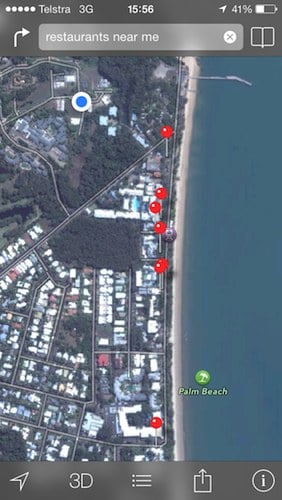
Have a look at the screen shot from my phone here.

digital-marketing-restaurants

The blue dot is me :)

In Apple Maps you start typing ‘restaurants’ and it helpfully suggests the ‘Restaurants near me’ search and then displays all of the ones that it knows of (the red pins). I’ve deliberately taken this screenshot without restaurant names, while there are a number of venues listed there is at least two that I know of that are bigger restaurants that simply don’t show up.

Apple Maps pulls a lot of it’s data from Yelp. I’ve written about services like Yelp before, review those posts here. If the restaurant either does not have a listed in Yelp or the listing is not setup correctly it won’t be shown. How much business do they miss because of this – who knows – but it has to be significant. I’m not the first person to turn to their smartphone to find somewhere to eat.

It’s not just food options that are missing!

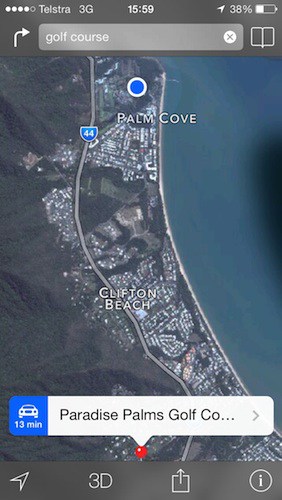
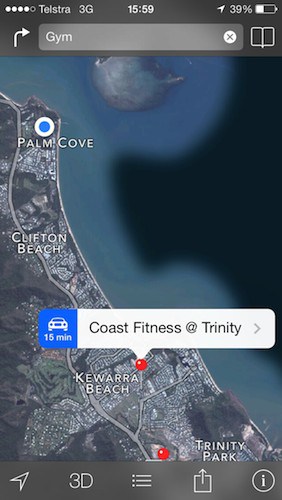
Fairly close to where we were staying there was a golf course, club and fitness centre. It’s tucked away in the northern end of Palm Cove but again from previous visits I knew it was there. Feeling like there was more alcohol and good food going in than there was exercise going out I was keen to visit the gym, again I tried to find the gym with my phone.

The two screenshots shown below, helpfully show me that there is a gym in Trinity Beach (about 15 minutes drive from Palm Cove) as well as another at Paradise Palms, again about 10 minutes drive away.

The gym that is just around the corner (I’m not kidding you, probably inside the blue dot – which is me again!) was not shown. For the same reasons the business has not gone to the trouble of getting itself listed in Apple Maps, I didn’t check Google Maps but it’s just as relevant to have your location based business listed there too.

digital-marketing-gyms digital-marketing-gym2

It’s impossible to be everywhere, right?

Well it is hard, gone are the days where the methods used by consumers to find a business were few (read Yellow Pages – remember the good old days?) – because of the multitude of options now a business has to work harder to get in front of potential customers. You may not be doing it but I can assure you that someone else is and they might well be your competitor.

It’s not all bad news though. Compared to the cost of a Yellow Pages ad getting a listing in Yelp will make you smile – it’s free.

How to get started

If you own or work for any business that operates out of a specific location ( think restaurant, cafe, gym, plumber, electrician, accountant {I’ll stop here – I’m sure you get the idea} ) get yourself listed in at least the main online tools that your customers use to find products and services.

Most of the sites listed here have a way of creating a business account and submitting your business to be listed. Start by searching for yourself, you may already be listed, if that is the case you’ll find that you can ‘claim’ the listing which means you’ll get access to edit it. Ensure that all the information is up to date and think about starting to interact with people’s comments and reviews (that’s another story for another blog post).

Start with these two:

  • Yelp / Apple Maps – Start here – biz.yelp.com.au
  • Google Maps – Start here google.com/local/add

If your business is a restaurant, hotel (or other accommodation) do some research on these:

  • Eatability
  • Trip Advisor

Yes there are more places to be but these are a good start.

Get to work on making it easy for new customers to find you!

Say hello :)

We'd love to hear about your WordPress project! Whether it's a rebuild of an existing website, a brand new website or you're looking for a team of WordPress professionals to consult on your project, we're here to help.

dma-logo-icon
help-for-wp-logo-dma-2
© 2026 The Digital Marketing Agency
  • Plugins
  • Privacy
Chat to us about your website project